DIY home security is becoming a popular option among homeowners due to high customizability and installation flexibility. It doesn’t require any prior technical knowledge on the part of the user, thus making it easily accessible!
If you don’t have a high budget to work with, that is completely fine. Under this DIY category, you can pick devices that don’t strain your pocket and also make you feel safe and secure while at home. Let’s explore other nuances and key considerations with respect to a do-it-yourself home protection setup.
What is DIY Home Security?
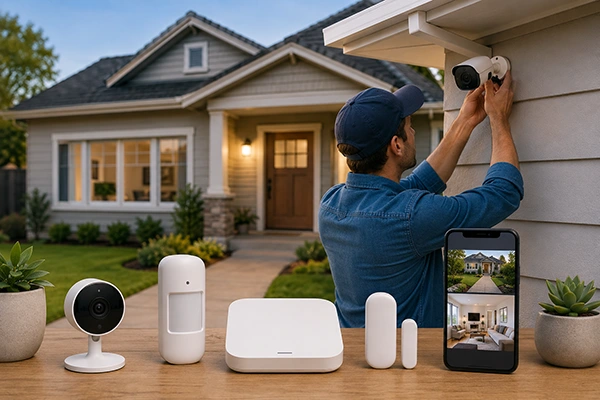
DIY home security is a type of safety option homeowners can consider. The only thing DIY refers to here is self-installation. In other words, you will have to handle the installation of the security devices yourself without any paid professional assistance by your side.
Furthermore, you can also be more flexible with the devices you choose. You can select what suits your house conditions best for maximum security. However, that is not the case when you deploy a professional company to assess your needs first and then recommend a suitable home security camera installation solution.
The key differences between DIY and professionally installed security systems are as follows.
| DIY security systems | Professionally installed security systems |
| Lower installation costs | High installation charges |
| Flexible device selection | Rigidity when it comes to selecting desired devices |
| Easy expansion and upgrades | Need professional approval and technical assistance for expansion- or upgrade-related preferences |
| Greater control over system settings | Little to no control over system settings |
Consider the following common components of a “do-it-yourself” house security setup.
- Security cameras
- Door and window sensors
- Motion sensors
- Smart locks
- Home alarm system
- Hub or base station
Handy tip: Make sure that you check the specifications of each device or item you purchase well in advance. So you don’t have to deal with any inappropriate device later during self-installation.
Benefits of DIY Home Security Systems
The major benefits of DIY home security are listed below. It includes lower installation costs, installation at your convenience, easy disassembly with high portability, and other points as provided below.
- Lower installation costs: You don’t need to hire any professional for installation. It can be done easily by yourself. And that advantage helps you save money that you can save or invest somewhere!
- Installation at your convenience: Whenever you have time, you can deal with the setup of a DIY security system without making any haste. Just install it at your own pace.
- Easy disintegration with high portability: Even if you don’t plan to live in a given place forever, you don’t need to worry about the installation. That is because you can remove the devices anytime and take the entire system with you wherever you are going.
- Flexible device selection: You get to pick devices that are under budget and suit your home security needs best. Decide on each component of the system as per your personal preferences and opinions. For example, homeowners who prefer a wireless setup can consider wireless security cameras for greater installation flexibility.
- Easy expansion and upgrades: You can check for major updates and upgrades on the internet and implement them as soon as possible. It is all up to you, as you are the technician of your own DIY home protection network.
- Greater control over system settings: Most DIY security setups are super easy to use. And you install them yourself, arranging them as you wish. This higher control over the system makes it feel super practical and pragmatic.
- Smart-home integration: You can easily integrate this system into your smart home. That will make your house protected as well.
- Self-monitoring: Be at home or away, you can monitor the status of your security system anytime. When at home, the control panel helps you do that, while a mobile app proves handy when you’re away.
What Do You Need for a DIY Home Security System?
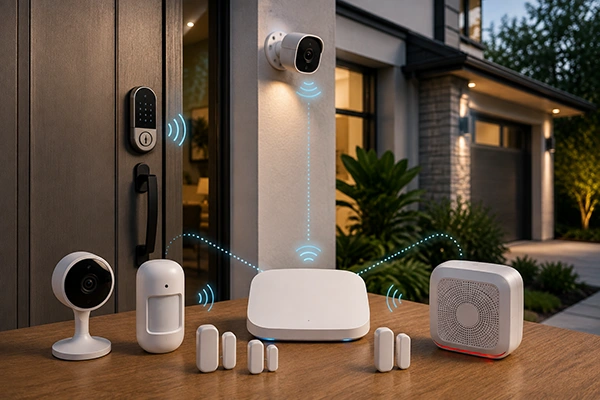
The major components that you need for DIY home security are security cameras, door & window sensors, motion sensors, smart locks, a home alarm system, and a base station. Each of these items is elaborated below.
1. Security Cameras
These are the most crucial part of this DIY security camera system. Owners can choose from a variety of indoor and outdoor cameras. Doorbell cameras are the most preferred devices in the DIY category. They blend well within the ordinary conditions of the entrance and don’t even give the wrongdoers a hint that there could be a device recording everything.
Note: These cameras are available in both wired and wireless options. Most owners choose wireless for a higher level of convenience.
2. Door and Window Sensors
When you install motion sensors within the frames of your doors and windows, your house becomes fully secured. As soon as any movement is detected from closing or opening, sensors will take note and alert the system immediately.
How is it installed? A sensor in this category is made up of two parts: a sensor (the smaller part) and a magnet. These are often installed near each other so that when the door or window is opened, both components move apart, activating the sensor. When that happens, your security system becomes alert as per your preferred settings.
3. Motion Sensors
These sensors are also a major part of the do-it-yourself setup. Their key purpose is to detect movements inside and around the house. That helps you learn about the presence of a dangerous person on the premises in advance so that you can do what seems best in your self-defense quickly.
The entrance, underground, doors, windows, etc., are the most ideal locations where motion sensors can be installed for maximum surveillance and safety.
4. Smart Locks
Smart locks are mostly an integral part of the smart house. They are often preferred for keyless entry and remote access. Their entire mechanism works by using unique codes for household members. No other person can enter the house if the lock doesn’t recognize their identity. That is one of the major advancements in home security systems in today’s ultra-high-tech world.
5. Home Alarm System
Now, let’s talk about DIY home security system home alarm system DIY. The two major parts here are alarms and sirens. An audible alarm sounds after a security breach, such as wrongful entry into the house or other types of movement. When the siren goes off, it serves two purposes simultaneously, i.e., scaring away the intruders and alerting the homeowners.
6. Hub or Base Station
This is the central control panel that connects with all the devices in your DIY home safety network and helps them function in a collaborative way. This brain part of the system contains the keypad that enables the user to arm or disarm the system as per the prevailing requirements.
How to Build a DIY Home Security System
To build one of the DIY home security systems that suit your house best, you have to go through certain steps. These are mainly related to assessing your home’s unique needs first and then selecting devices that will ensure a maximum level of security. For more, consider the following.
1. Assess Your Home’s Security Needs
Take note of all the compromised parts in your house. For example, it could be your entrance door, a window by the main road, or some other highly susceptible spots! You must know about all these areas in advance that are most likely to put your security and privacy at risk.
2. Choose the Right Security Devices
Once you have identified the unique security needs of your house, it is time to select the best devices for maximum protection from intrusion. That includes picking the suitable cameras, sensors, locks, and alarms based on the circumstances. Don’t rush the process. Instead, set aside enough time for proper research and evaluation before finalizing your purchases. If you prefer a wired setup, wired PoE security cameras can also be considered when selecting suitable devices.
3. Plan Camera and Sensor Placement
Next comes the need for the most optimal placement of cameras and sensors. So they can deliver the utmost level of security. Plan on covering windows, doors, driveways, garages, and other such areas properly as per your requirements. Don’t just install your devices right away wherever you feel like doing so. Proper planning before installation is key for maximum coverage.
Note: While installing components of your DIY home security systems, make sure that you avoid blocked views. Double-check that all the cameras are producing clear videos of their surroundings.
4. Install and Connect the Devices
Once you have made your plans for the right placement, move on to the installation and connection process. Always refer to the user’s manual in order to learn the right way to install all the devices and connect them to the central hub. For homeowners who need assistance with this step, wireless security camera installation is an option to consider.
Note: This might require a WiFi connection, so make sure you have one up and running before you proceed to set up the system.
5. Set Up Alerts and Monitoring
After installation and connection to the base station, ensure all the settings are configured well as per your preferences. Learn about all the features and settings from the instructions provided in the manual again. Make sure all the alert notifications on your smartphone are turned on. Use mobile applications to handle your DIY home security system on the go.
6. Test the Entire System
Lastly, check the performance of each device against the key claims of the brand. Put your installed system to the test by setting up false intrusion instances. See if the alarm goes off right on time!
Note: If you don’t get full coverage of the target area, your camera placement might require repositioning. Try out different angles and configurations before you get the right view. The trick is to place the camera in such a way that there is no spot without surveillance.
How to Set Up a DIY Security Camera System
To set up your home security systems DIY, first of all you need to decide on the number of cameras you require. Then, you have to deal with the right placement and ensure security devices are properly powered up. Further steps are provided below.
- Decide how many cameras you need. For that, you will have to assess your house security needs first. For example, if your house shares a common wall on either side and there is only one main entrance, one or two cameras would be more than enough! However, you can add more if you want. A 4-camera security system may be suitable when multiple areas need coverage.
- Choose indoor and outdoor placement. Not only the outside, but the security system must also cover the inside of your house as well. Thus, pick a spot for installation that provides a 360-degree view.
- Connect cameras to power or charge batteries: Make sure that all your cameras are connected to the power supply in case they need electricity to operate. Or insert the charged batteries if applicable!
- Connect them to the network: Once all cameras, sensors, or whatever device you need is installed in the right place, ensure that you connect them to the central control panel of your network.
- Configure recording and motion detection: Check that all the settings are set to the right levels and modes. You can easily handle this part through a mobile application. Learn how to do it anytime from the user’s manual provided by the manufacturers of your devices.
- Test live viewing and notifications: Put your DIY system to the test by setting up a false intrusion. If your sensors alert the system as soon as this intrusion happens, everything is working fine! Ensure you get timely notification and the noise alert kicks off right on time.
Home Alarm System DIY: What to Consider
In a DIY home security system, don’t forget to consider key components, such as entry sensors, motion detectors, glass-break sensors, sirens, and emergency alerts, as listed and explained below.
- Entry sensors: This part will alert the system and you whenever someone has entered your house or is even standing at the door.
- Motion detectors: The primary work of a motion detector is to detect all types of movement within a specified range and then alert you of that. So, you can learn about a harmful presence, if any, in time.
- Glass-break sensors: The work of this sensor is also the same as others. As soon as glass, whether on the window or otherwise, happens to break, this sensor gets activated, sending you alert notifications on your smartphone or kicking off the siren to blare as per the preferred system settings.
- Sirens: These are a critical and audible part of the core alert system. When someone breaks into your house with criminal intentions, a siren blares loudly and notifies the owner of the event!
- Emergency alerts: Make sure that your DIY security system also works in case of fire, gas leak, or other types of residential emergency situations.
DIY Home Security vs. Professional Home Security
The key differences between a DIY home security system and a professional setup are related to installation, cost, customization, monitoring, maintenance, and scalability. All of these aspects are highlighted in the table below.
| Difference Points | DIY Home Security | Professional Home Security |
| Installation | Easy and self-manageable | Requires technical knowledge |
| Cost | Lower | Higher, including installation charges |
| Customization | Higher, as you can select devices as per your specific needs and install them exactly as you want | Lower, you don’t have any say in the process, and a professional operates in a pre-planned manner |
| Monitoring | Users being solely responsible for checking security outputs and analyzing whether a particular alert points to a real threat | Handled by a team of professionals continuously observing the security outputs and accurately distinguishing real threats from ordinary alerts in real time |
| Maintenance | Users’ burden | Managed by your professional home security company |
| Scalability | Easy and cost-effective | Expensive and requires expert assistance |
When professional help is preferred, options such as outdoor security camera installation can help with cameras intended for exterior areas.
Common DIY Home Security Mistakes to Avoid
The common mistakes that DIY home security lovers make are listed below. The list includes installing too few cameras, leaving blind spots, using weak passwords, and others, as provided below.
- Installing too few cameras is the first mistake. It will lead to less coverage, leaving some spots compromised.
- Leaving blind spots provides an opportunity for a security breach. Watch out for poor placement of cameras, narrow viewing angles, or physical obstacles, if any. All of these are key hindrances to full area coverage.
- Never use weak passwords. They can put your entire security system at risk at any given time. Always use the strongest and less-known patterns.
- Ensure software and firmware updates from time to time. So your system is up to date with the latest security features. Outdated home security systems are highly susceptible to being attacked by cyber criminals.
- Placing motion sensors incorrectly is another mistake. To avoid this particular mistake, ensure that you check the proper functioning of the sensors after their installation.
- Relying entirely on one security device should be avoided as well. That is because machines can fail at any time. And thus, you must always have a backup security system in place to be operative in the case where the primary one has failed to serve its purpose well.
- Ensure that you test your system regularly. Many DIY owners fail here, and their system becomes inoperative without their conscious knowledge while they are under the impression that they have a fully functional home security system in place. To avoid this situation, make sure that you test your setup at reasonable intervals.
How to Maintain a DIY Home Security System
To keep your do it yourself home security systems up and running all the time, follow the following checklist. It talks about checking camera functionality, battery recharge or replacement, periodic updates, etc. If any component needs replacement or additional setup, security camera accessories can be considered as part of maintaining the system.
- Check camera functionality. You might be under the impression that your security system is fully functional, while it might have already broken due to some hidden reason. So, always ensure that it is working properly from time to time or whenever you are free.
- Replace or recharge batteries. So you don’t miss the recording of any critical event or security breach due to insufficient power.
- Update device software. When you ensure this periodically, all the latest security features become available to you, and your security system becomes better shielded against potential cyber attackers.
- Review access permissions. Don’t allow any third party to access your control panel. And make sure that you review access permissions at frequent intervals. Someone you allowed to access the system in the past might have accidentally or intentionally changed the access settings.
- Test alarms and sensors periodically. That will help you learn if anything is wrong with this critical aspect of the security system.
Conclusion
DIY home security is the best if you are looking for an easy-to-install, affordable option. You don’t need a professional service provider for its setup. In the marketplace, there are various products available under the category of DIY home security systems. In the marketplace, there are various products available under the category of DIY home security systems, including complete security camera systems.
So, you can either buy a readily available kit or make your system on your own by selecting and purchasing each component separately. However, either way, make sure you don’t rush the process and give it enough time for an informed decision. For entry-point monitoring, doorbell cameras can also be included as part of the overall setup.
Frequently Asked Questions
What is DIY home security?
When you choose home security devices on your own and install them throughout your house without any professional help, it is often known as DIY home security. Here, you can either monitor the system yourself or deploy a pro service to do it for you. The option of professional monitoring is available under a DIY security system as a paid service.
Are DIY home security systems worth it?
Yes, it is worth it, especially when you are considering a home safety solution that satisfies your residence’s specific needs well. You can choose the most suitable camera as per the coverage requirements. Additionally, you don’t need to spend anything on professional installation, so you can spend that money as well on cutting-edge security devices.
What do I need for a DIY home security system?
Most importantly, you need security cameras, door & window sensors, motion sensors, smart locks, a home alarm system, and the control panel. However, you can also add to these core components any of the latest gadgets available in the marketplace.
How do I set up a DIY security camera system?
The process depends on the particular product you have purchased. In general, to set up a DIY security camera, you just need to follow the instructions provided in the user’s manual. If you cannot follow what is written there properly, contact the support team, and they will guide you through the required steps.
Can I install a home alarm system myself?
Yes, you can easily install a home alarm system yourself. Most products on the market come with easy-to-understand user manuals on key installation steps. So, you mustn’t experience any difficulty while setting it up. Yet, even if it feels overwhelming, you can book a professional installation as well. Many DIY security device manufacturers provide such services.
Is DIY home security cheaper than professional installation?
Yes, it is cheaper, but only in the sense that you might not have to pay for the setup charges, and you can pick up devices that are within your budget.
Can DIY home security systems be monitored remotely?
Yes. You can monitor the system remotely, often with the help of your smartphone via a dedicated brand application.
Sources: